DUO Balance Skill Game

Review
DUO stands out with its clever rotating dot mechanic, which adds a fresh twist to the classic obstacle avoidance genre. The controls are simple, yet the game demands patience and precision. Its clean design and progressive difficulty keep you coming back for more. Ideal for casual players seeking a calm but rewarding challenge.
About This Game
Game Introduction
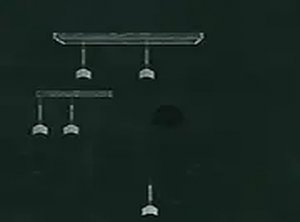
DUO is a delightful and engaging skill game that challenges your timing and coordination. The core objective is simple: guide a pair of rotating dots upward through a series of obstacles without touching them. What makes DUO unique is the continuous rotation of the two dots, which requires you to maintain perfect balance and choose the best moment to pass through narrow gaps. The game features a clean, minimal design that makes it easy to focus on the action. Each level presents new patterns and obstacle arrangements, keeping the experience fresh and rewarding. Whether you have a few seconds or several minutes, DUO fits perfectly into your day, offering a relaxing yet stimulating way to test your reflexes and patience. It is suitable for players of all ages who enjoy a calm but challenging gameplay experience.
How to Play
To play DUO, you tap the screen to make the two dots move upward. The dots rotate continuously, so you must watch their movement and time your taps carefully to avoid hitting obstacles. The key is to wait for the right moment when the dots align with the openings in the obstacles. If you touch an obstacle, the game ends, so staying focused and planning your moves is important. The game gets progressively harder as obstacles become more complex, but practice helps improve your timing. No special skills are needed—just a steady hand and a calm mind. Enjoy the challenge and see how far you can go.
Game Features
Simple tap controls make the game easy to pick up and play. The rotating dot balance mechanic adds a unique twist to the classic obstacle-avoidance genre. Progressive obstacle difficulty ensures that the challenge grows as you improve. Endless replayability means you can keep playing to beat your high score, making each session feel fresh. The clean design and relaxing pace make it suitable for short breaks or longer play sessions.
Tips for Success
Focus on the rhythm of the rotating dots rather than rushing your taps. Patience is key—wait for the perfect alignment before tapping. Practice regularly to get a feel for the timing. Stay calm, as frustration can lead to mistakes. Observe the obstacle patterns and anticipate upcoming gaps. Short, focused sessions can help improve your reflexes over time.